
There are a lot of lists of open source video editors out there, but most of them are outdated.
Some still recommend Olive, which hasn't had a release since 2019. Others include DaVinci Resolve, which isn't even open source.
And just because an editor is free doesn't mean it's good. Some of these tools are powerful but have terrible interfaces. Others look promising on GitHub but haven't been updated in years.
So here's a look at the open source video editors actually worth considering in 2026.
I'm also going to leave out projects that haven't had a release this year. If a project hasn't shipped anything in that long, I don't think it belongs on a list of the best editors you can use today.
The short answer
If you want a traditional desktop editor, Kdenlive and Shotcut are probably your best options. Both have been around for years, support Windows, Mac and Linux, and have most of the features you'd expect from a serious video editor.
The problem? They're ugly.
Both feel like software built by engineers for engineers. They're powerful, but the interfaces aren't particularly friendly, especially if you're new to editing.
OpenShot is easier to learn, although it has its own limitations.
LosslessCut is great if all you need to do is trim or cut videos without losing quality.
If you want something that runs in your browser, there are two interesting projects: OpenCut and Donkey Cut.
OpenCut got a lot of attention as an open source CapCut alternative, but the original project has been archived and its replacement hasn't delivered a usable editor yet. I wouldn't recommend building a workflow around it.
Donkey Cut is another browser-based editor. Full disclosure, it's our project. You can edit videos with a traditional timeline or use an AI assistant to do the editing for you. You can also use it without installing anything.
Open source video editors compared
| Editor | Platform | Best for |
|---|---|---|
| Kdenlive | Windows, Mac, Linux | Advanced editing |
| Shotcut | Windows, Mac, Linux | Format support and HDR |
| OpenShot | Windows, Mac, Linux | Beginners |
| LosslessCut | Windows, Mac, Linux | Fast trimming |
| Donkey Cut | Browser, Mac app | Traditional editing and AI-assisted editing |
| Blender | Windows, Mac, Linux | 3D and video workflows |
I'm leaving Flowblade, Avidemux and Olive off the main recommendation list. Flowblade's last listed release was in December 2025, while Avidemux and Olive haven't had stable releases in years.
Kdenlive
Kdenlive is probably the most complete traditional open source video editor available.
It has multiple video and audio tracks, keyframes, effects, proxy editing, titles and most of the tools you'd expect from something like Premiere Pro.
It's also actively maintained, which matters. The developers ship updates regularly, and the October 2026 release includes more improvements and bug fixes.
It even has some surprisingly good AI features. You can generate subtitles locally using Whisper, translate them and use SAM2 to mask objects or remove backgrounds.
But I have a hard time recommending it to someone who's never edited videos before.
The interface is cluttered. There are panels, buttons and settings everywhere. It feels like you need to spend a few hours learning the software before you can make something simple.
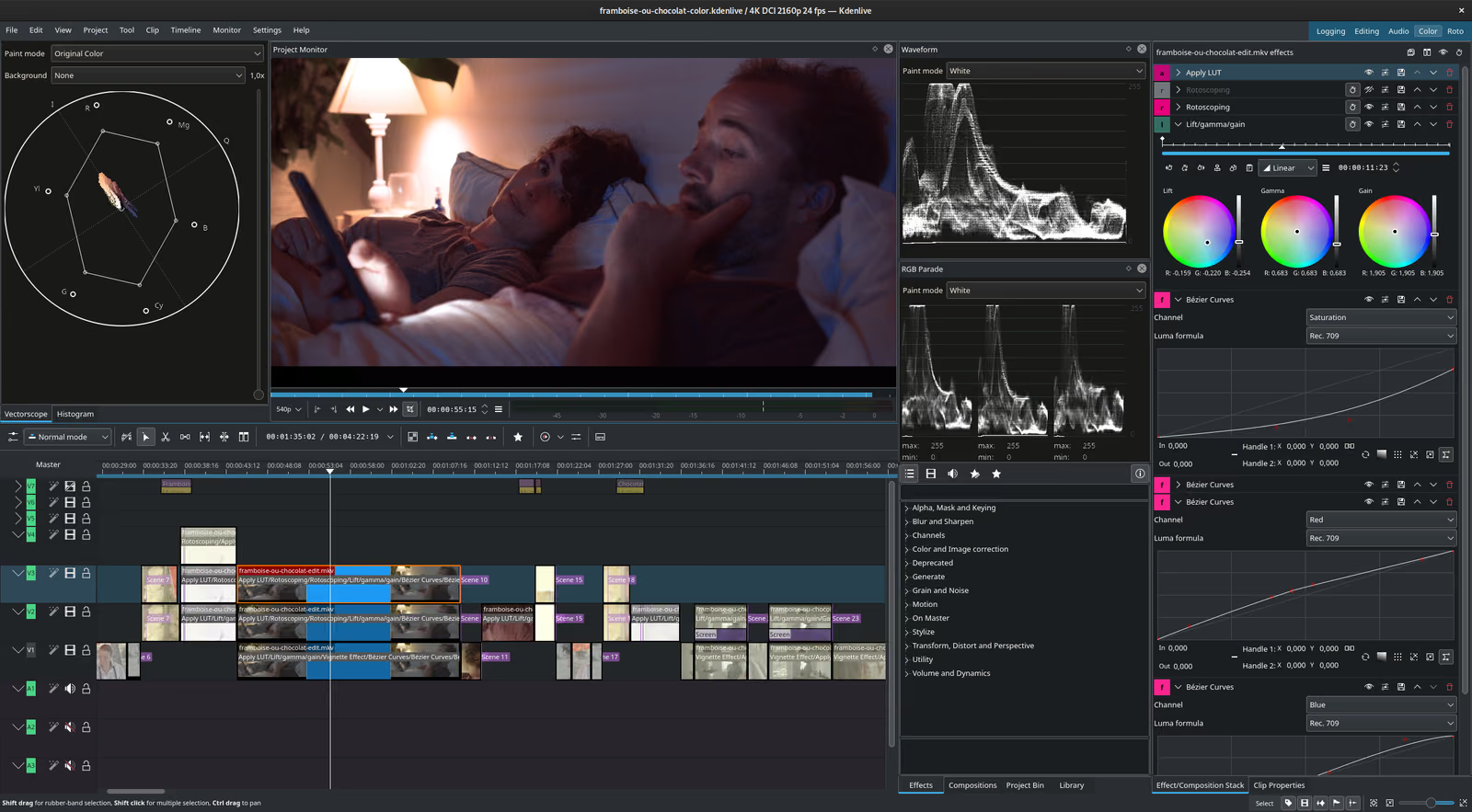
If you're willing to put in that time, Kdenlive is a great free option. But if you're looking for something simple and modern, this probably isn't it.
Shotcut
Shotcut is another well-established open source video editor.
Like Kdenlive, it's powerful and actively maintained. It supports a huge range of formats, has HDR support, and can generate subtitles locally using Whisper.
It also runs on Windows, Mac and Linux, including native support for Apple Silicon Macs and Windows ARM devices.
The interface is a little different from Kdenlive. Instead of showing everything at once, Shotcut lets you open and arrange the panels you need.
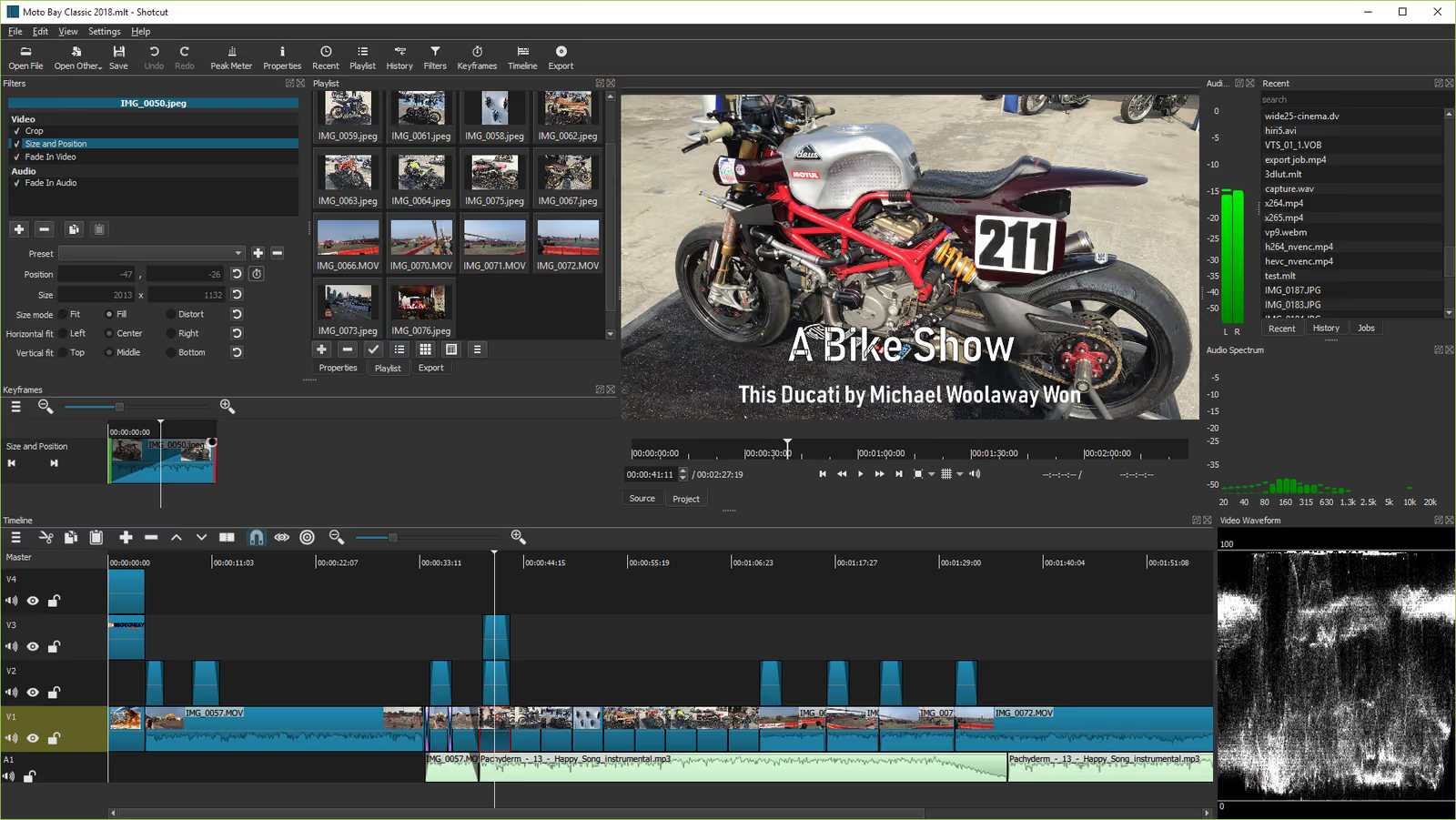
Personally, I don't think it's much better.
It still looks and feels like an older desktop application. There's nothing particularly modern or intuitive about it.
But if you need a reliable editor with good format support and don't care much about the design, Shotcut is worth trying.
OpenShot
OpenShot is probably the easiest traditional open source editor to get started with.
You can drag clips onto the timeline, add transitions, insert text and export your video without spending hours learning the software.
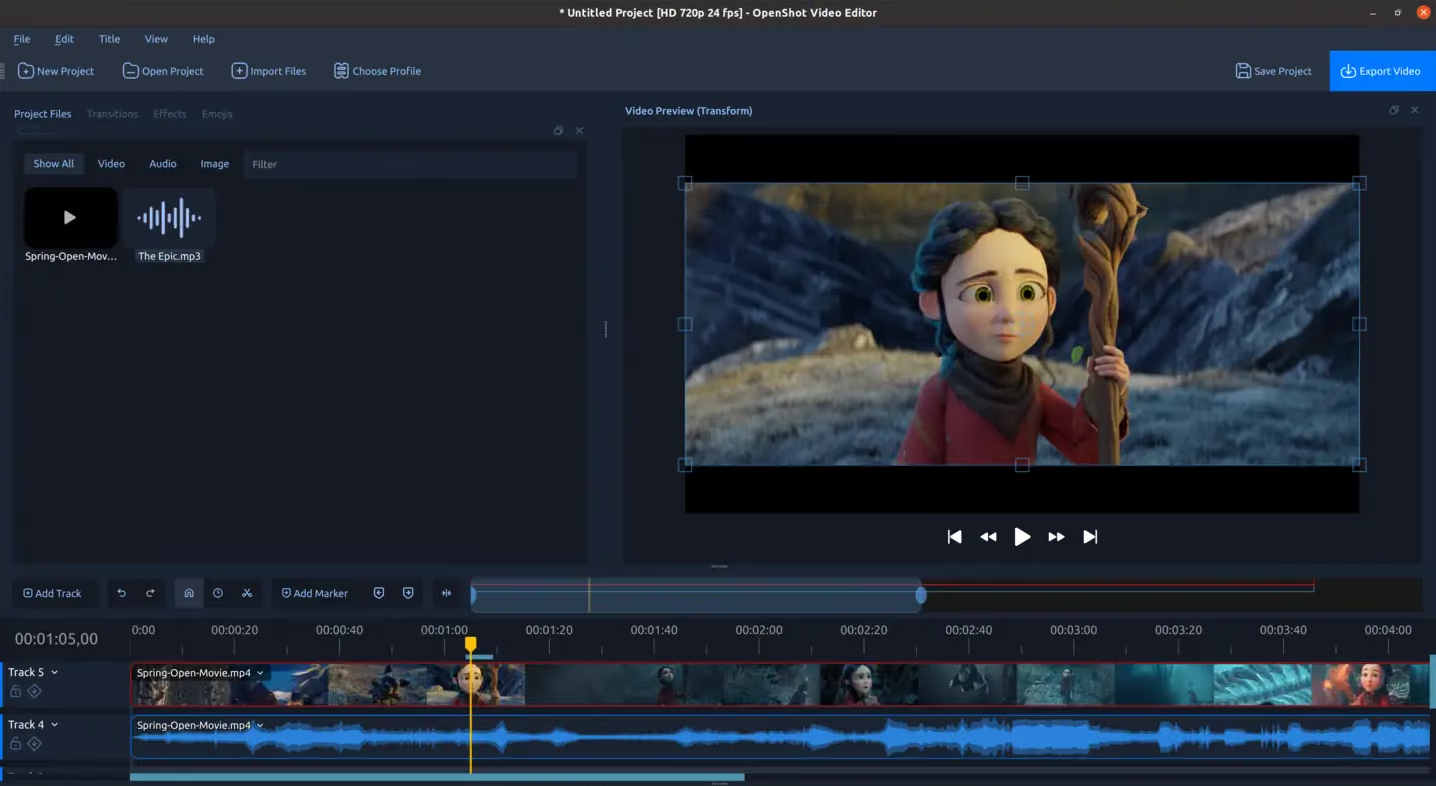
It's a much friendlier starting point than Kdenlive or Shotcut.
OpenShot has also improved quite a bit recently. The newer releases include better performance, GPU acceleration, proxy editing and even experimental AI integrations through ComfyUI.
That said, it still has a reputation for struggling with larger projects.
I think it's a reasonable choice for someone making their first few videos. But if you're editing regularly or working on more complicated projects, you'll probably outgrow it.
Blender Video Sequence Editor
Most people know Blender as a 3D application, but it also includes a video editor.
And it's a real editor, not just a basic trimming tool.
You can arrange clips on a timeline, add effects, work with audio and combine everything with Blender's 3D and compositing tools.
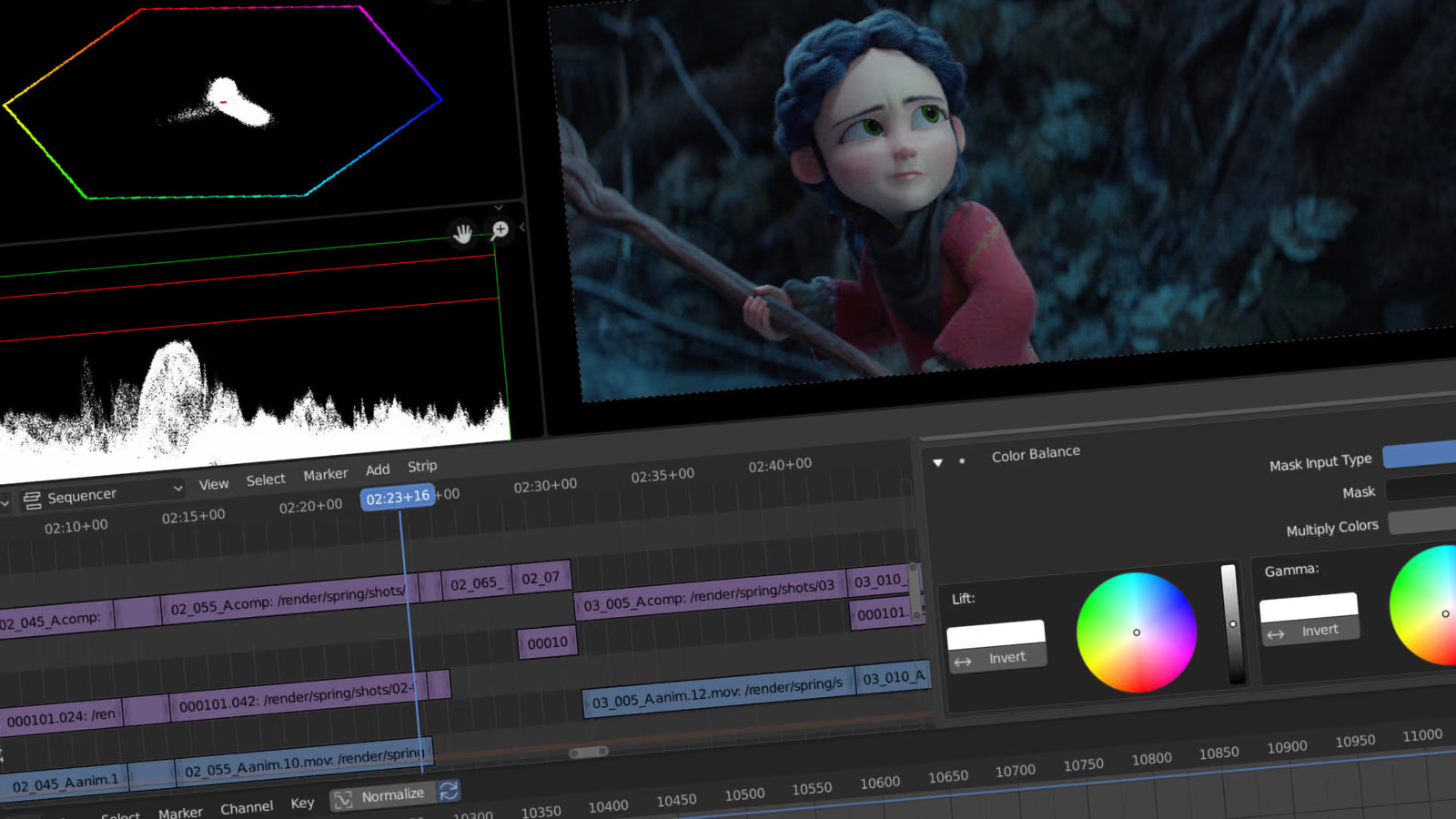
The problem is that you're still using Blender.
If you already know Blender, having video editing built into the same application is genuinely useful.
But I wouldn't recommend learning Blender just to edit videos. There are much easier ways to do that.
LosslessCut
LosslessCut is a little different from everything else on this list.
It's not trying to replace Premiere Pro or CapCut. It does a few things, and it does them really well.
You can cut, trim, merge and convert video files without re-encoding them.
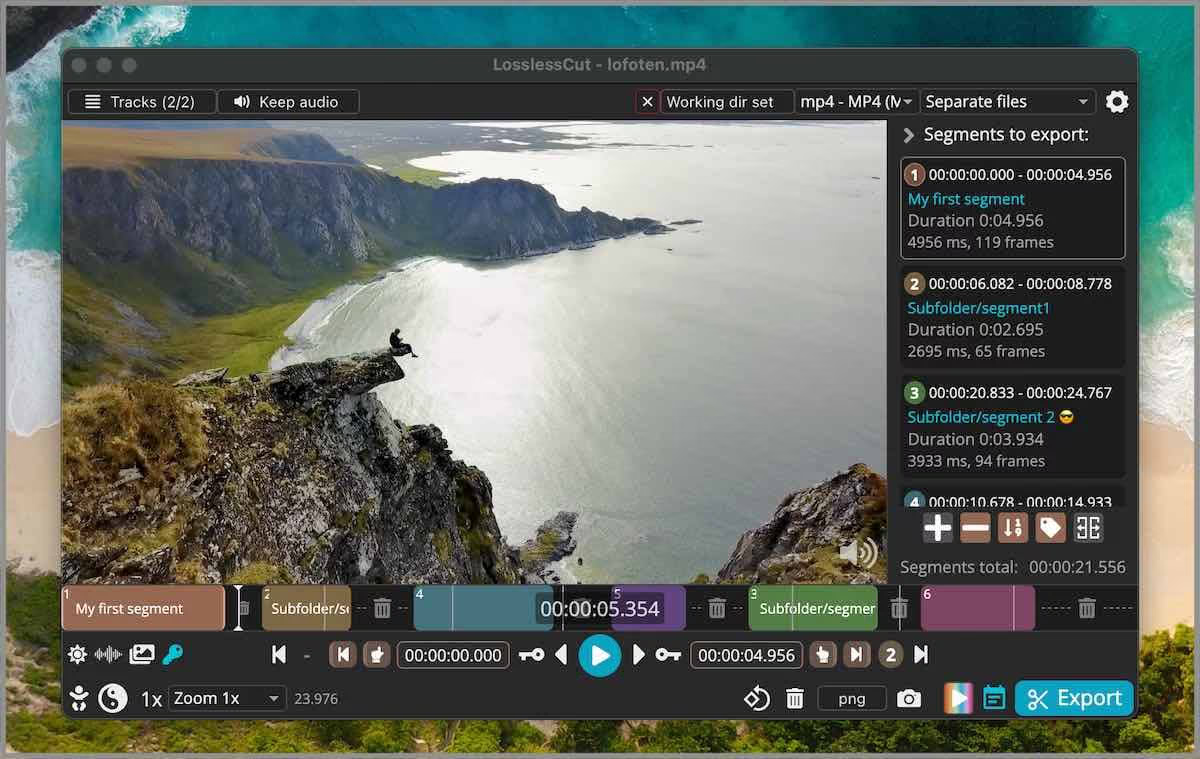
That means you can take a two-hour recording, cut out the section you want and save it in seconds without losing quality.
There is one limitation: cuts aren't always frame accurate because LosslessCut works with video keyframes.
But for trimming recordings, removing unwanted sections or splitting large files, it's excellent.
I wouldn't use it to edit an entire YouTube video, but it's a great tool to have alongside another editor.
OpenCut
OpenCut is an interesting story.
It launched in 2025 as an open source alternative to CapCut and quickly became one of the most popular video editing projects on GitHub.
It has tens of thousands of stars, which is impressive.
But GitHub stars don't necessarily mean a product is good or actively maintained.
The original OpenCut repository was archived in May 2026. The developers announced a complete rewrite, but that replacement hasn't delivered a usable editor yet.
The old browser editor is still accessible, but development on that version has stopped.
This is why I don't think OpenCut belongs on a list of the best actively maintained open source video editors.
It had a lot of momentum, and people clearly wanted an open source CapCut alternative. But until the new version actually ships, I'd consider the project abandoned rather than recommend it.
Donkey Cut
Donkey Cut is our open source video editor, so I'm obviously biased here.
I started working on it because I wanted video editing to be simpler.
Most traditional editors have hundreds of buttons, panels and settings. That's great if you're a professional editor, but it's overwhelming when all you want to do is make a video.
Donkey Cut takes a different approach.
You can use it like a regular editor, with a timeline, multiple tracks, transitions, effects, captions, music and color grading.
Or you can describe what you want in chat.
For example, you can ask it to remove silences, add captions, assemble clips or change how a video looks. It makes those edits directly on the timeline, and you can still adjust everything manually afterward.
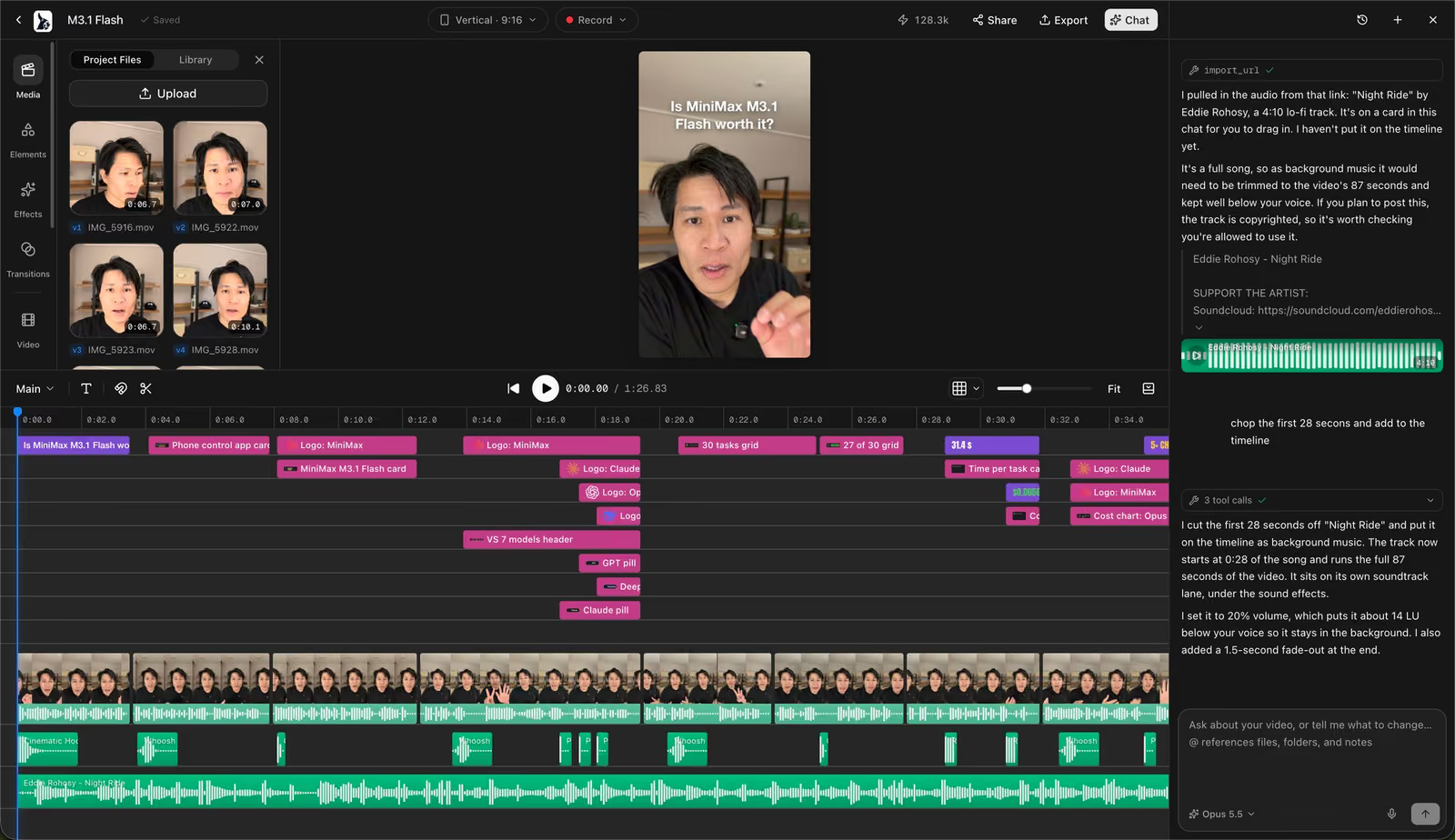
It runs in the browser, so there's nothing to install. There's also a Mac app, and you can choose whether to keep your project locally or in the cloud.
The editor itself is free and open source under the Apache 2.0 license. You can also use your existing Claude Code or Codex subscription for editing assistance on a Mac.
There are limitations.
It's a much newer project than Kdenlive or Shotcut, so it doesn't have the same history or community behind it.
But if you're looking for a simpler editor, especially one where you can use AI to help with the work instead of doing everything manually, it's worth trying.
You can try it at donkeycut.com, and the source code is on GitHub.
Which open source video editor should you use?
It really depends on what you're trying to make.
For serious desktop editing: Kdenlive or Shotcut. They're not pretty, but they're mature, powerful and regularly updated.
For beginners: OpenShot. It's easier to get started with than most traditional editors.
For trimming recordings: LosslessCut. It's fast, simple and doesn't reduce video quality.
For Blender users: Blender's built-in Video Sequence Editor. It makes sense if you're already working in Blender.
For browser-based editing: Donkey Cut. You don't have to install anything, and you can switch between editing manually and asking an assistant to help.
I wouldn't recommend OpenCut or Olive right now. Both have attracted attention, but neither has a currently maintained, stable release I would recommend relying on.
What about AI features?
A lot of open source editors are starting to add AI features, but they don't all work the same way.
Kdenlive and Shotcut use AI mostly for specific tasks, such as generating subtitles. Kdenlive also supports object masking and background removal.
These are useful features, and many of them run entirely on your computer.
Donkey Cut goes further by letting you describe edits in natural language. Instead of finding the right tool and applying it yourself, you can ask the assistant to make the changes.
It can also generate images, videos, voiceovers and music, although those generation features use paid credits.
Neither approach is necessarily better for everyone. If you enjoy editing manually, traditional editors give you plenty of control. If you'd rather spend less time learning the interface, an assistant can make the process easier.
Frequently asked questions
What is the best open source video editor?
For traditional desktop editing, I'd pick Kdenlive or Shotcut. They're mature, actively maintained and have plenty of features.
If you're a beginner, OpenShot is easier to learn. If you want to edit in a browser or use an AI assistant, try Donkey Cut.
Is DaVinci Resolve open source?
No. DaVinci Resolve has a free version, but it's proprietary software. You can't access or modify its source code.
Is CapCut open source?
No. CapCut is closed source, even though some of its features are available for free.
What is the easiest open source video editor?
OpenShot is probably the easiest traditional desktop editor.
Donkey Cut is another option if you'd rather describe the changes you want instead of learning every editing tool.
Do open source video editors add watermarks?
The established open source editors covered here, including Kdenlive, Shotcut, OpenShot, Blender and LosslessCut, don't add watermarks to exported videos.
Can I edit videos in my browser?
Yes. Donkey Cut runs directly in your browser without installing anything. OpenCut also has an older browser editor available, although its original project is no longer actively developed.
Are open source video editors free for commercial use?
Yes. You can use these editors to create videos for YouTube, clients or commercial projects.
Open source licenses generally govern how you use and distribute the software itself, not the videos you create with it.
Final thoughts
I think open source video editing is in an interesting place.
The traditional editors have become quite powerful. Kdenlive and Shotcut can handle a lot of the work people normally associate with expensive commercial software.
But the user experience hasn't improved nearly as much.
A lot of these editors still feel complicated and outdated. And I don't think video editing needs to be that hard for someone who just wants to make a decent video.
That's part of why we're building Donkey Cut.
I think there's room for open source editors that are powerful without being complicated, and that let people focus more on making videos than learning software.
For now, there's no single editor that's best for everyone. Pick the one that fits the kind of videos you're making, and don't assume the project with the most GitHub stars is necessarily the best one.
Edit your next video with Donkey Cut
A free, open source video editor. Edit with chat, generate video, images, voiceovers and music, and keep your projects on your own machine.
Open Donkey Cut