
Descript is an interesting video editor because it lets you edit videos like a document.
Instead of cutting clips on a timeline, you can delete words from a transcript, and Descript removes those sections from your video.
It also has some genuinely useful features, like removing filler words, cleaning up bad audio and cloning your voice so you can fix a sentence without recording it again.
The problem is that Descript isn't cheap anymore.
Its pricing has changed quite a bit, and features that used to feel included now come with limits on media minutes and AI credits.
So I wanted to look at the open source alternatives.
The tricky part is that there isn't one open source editor that does everything Descript does.
Some are great at transcript editing. Others can remove silences automatically. A few can clean up audio or generate speech.
Here's what I'd actually recommend, depending on which Descript features you care about.
The short answer
If you want to edit audio by deleting words from a transcript, Audapolis is probably the closest open source alternative.
If you want transcript editing inside a full video editor, Kdenlive is a good option. It's powerful, although the interface is complicated and pretty ugly.
OpenChatCut is another interesting project with transcript editing and an assistant, but it's still early.
If you mainly use Descript to remove filler words, pauses and repeated takes, Donkey Cut is worth trying. Instead of editing a transcript, you can ask it to clean up the recording, and it makes the cuts on a timeline.
For improving bad audio, Resemble Enhance is probably the closest open source alternative to Studio Sound.
And if you want voice cloning, OpenVoice V2 is worth looking into.
None of these is a complete replacement for Descript. But depending on what you're using Descript for, you might not need all of its features.
Open source Descript alternatives compared
| Tool | Best for | Runs locally | License |
|---|---|---|---|
| Audapolis | Editing audio by editing text | Yes | AGPL-3.0 |
| Kdenlive | Transcript editing in a full video editor | Yes | GPL-3.0 |
| OpenChatCut | Transcript editing with an assistant | Partially | AGPL-3.0 |
| auto-editor | Automatically removing silences | Yes | Unlicense |
| Donkey Cut | Removing filler words, pauses and retakes with chat | Partially | Apache-2.0 |
| video-use | Automated editing from coding agents | Partially | MIT |
| Resemble Enhance | Improving voice recordings | Yes | MIT |
| DeepFilterNet | Removing background noise | Yes | MIT / Apache-2.0 |
| OpenVoice V2 | Voice cloning | Yes | MIT |
The important thing to understand is that these tools solve different problems.
If you're looking for Descript's text-based editing, start with Audapolis or Kdenlive.
If you're mostly trying to spend less time cleaning up recordings, tools like auto-editor and Donkey Cut take a different approach.
Audapolis
Audapolis is probably the closest open source alternative to Descript's original idea.
You import an audio recording, Audapolis transcribes it, and then you edit the recording by editing the text.
Delete a sentence from the transcript, and it removes that section from the audio.
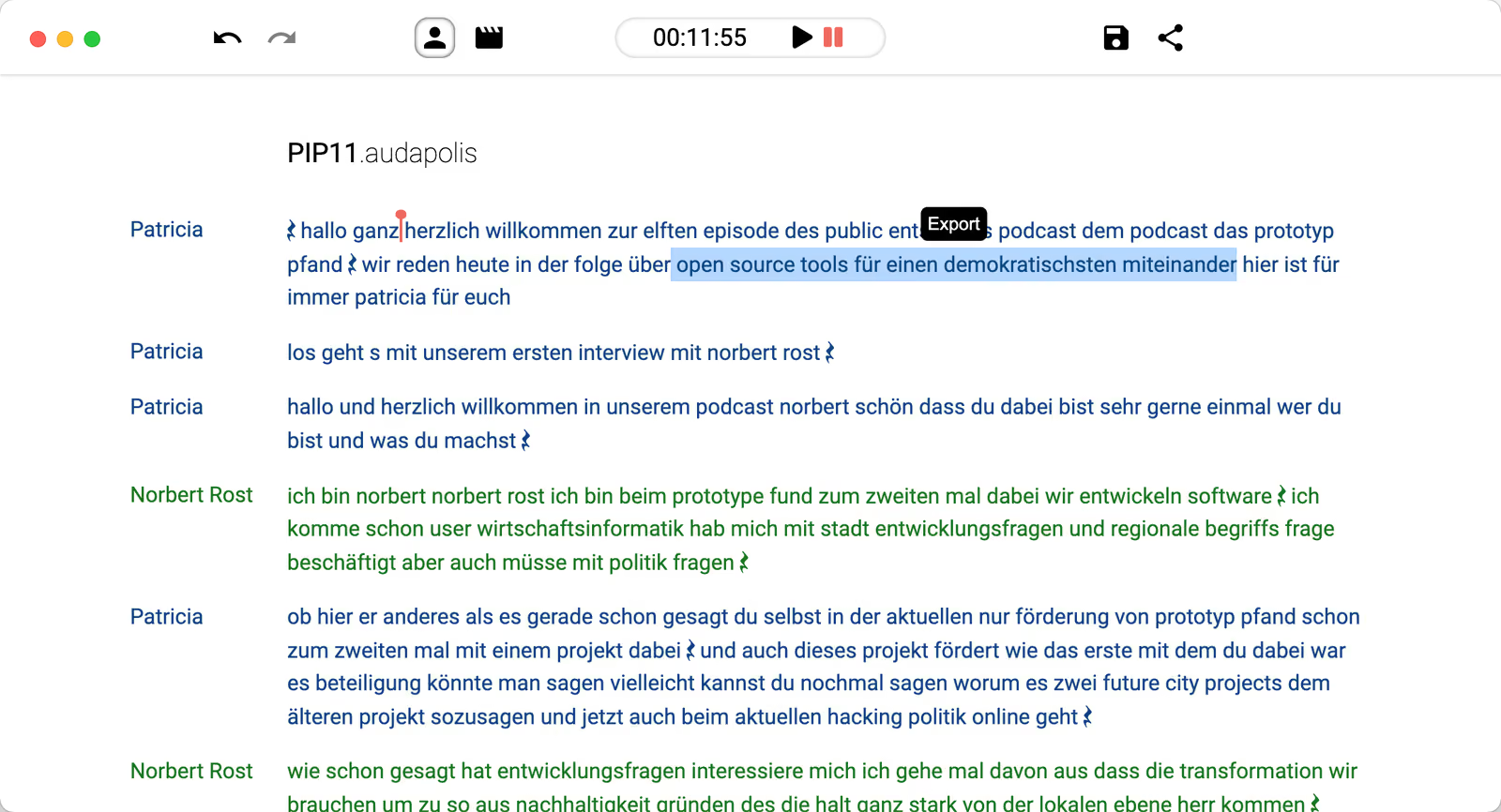
It's a much simpler way to edit spoken content than dragging clips around on a timeline.
Audapolis also runs entirely on your computer. You don't need an account, API key or cloud service.
It supports Windows, Mac and Linux.
The limitation is that it's primarily an audio editor.
If you're editing podcasts, interviews or voice recordings, that's fine. But if you're making YouTube videos with multiple video tracks, effects, captions and music, you'll probably need another editor.
For podcast editing, though, Audapolis is one of the first tools I'd try.
Kdenlive
Kdenlive is a full open source video editor that also supports transcript-based editing.
It can transcribe your recordings locally using Whisper or VOSK. You can then use its Speech Editor to make cuts based on the transcript.
It also supports silence removal.
Unlike Audapolis, Kdenlive is a complete video editor.
You get multiple tracks, effects, keyframes, color correction, titles and all the other tools you'd expect from traditional editing software.
The problem is the interface.
Kdenlive is powerful, but it's not particularly easy to use. There are a lot of panels, settings and buttons, and the transcript editing workflow isn't as smooth as Descript's.
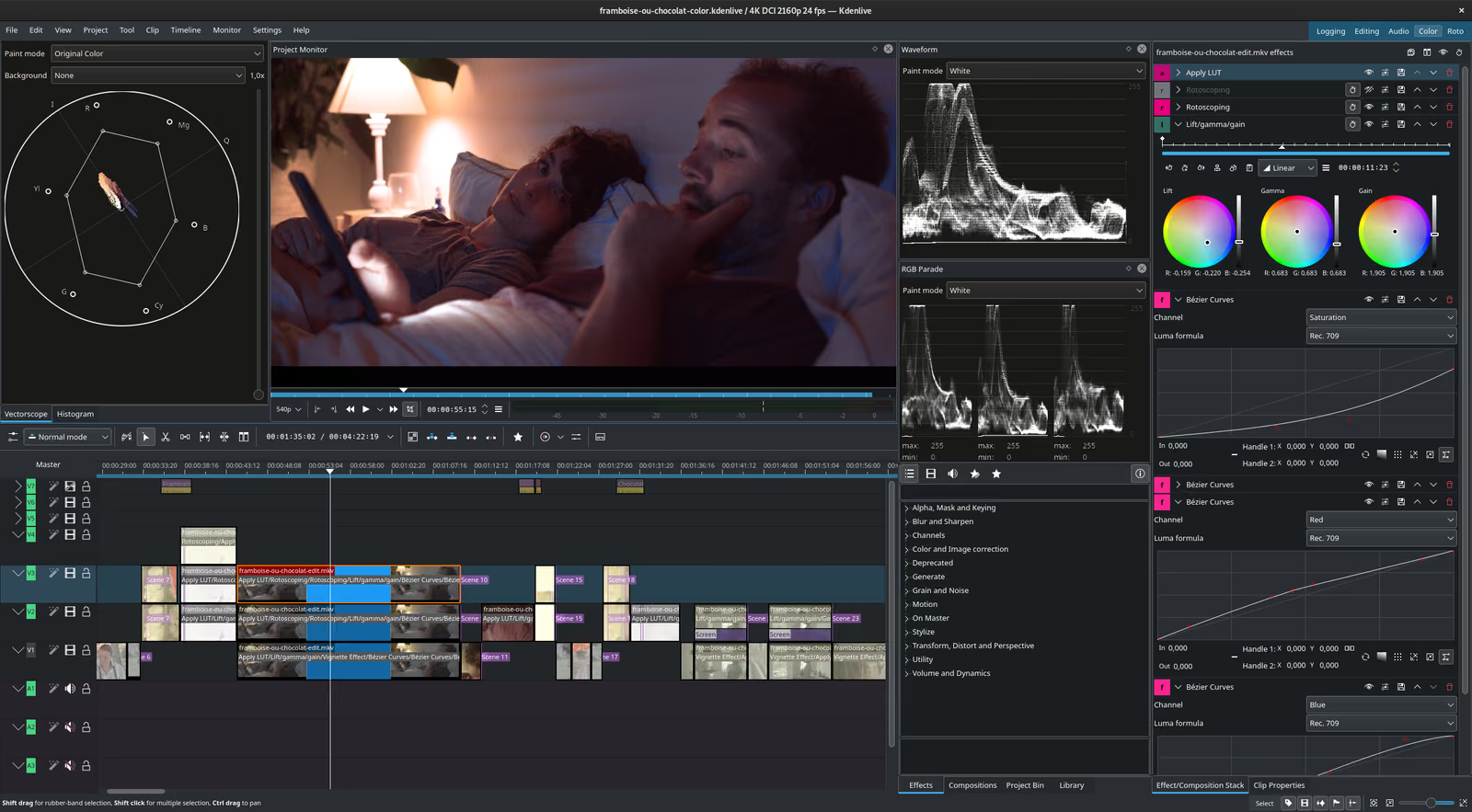
It also doesn't have the same automatic filler-word removal experience.
Still, if you want a free editor that can handle both transcript editing and traditional video editing, Kdenlive is a strong option.
OpenChatCut
OpenChatCut is a newer open source editor that's trying to make video editing easier.
It supports word-level transcription, editing from a transcript, removing pauses and isolating vocals.
It also has a chat assistant that can make edits for you.
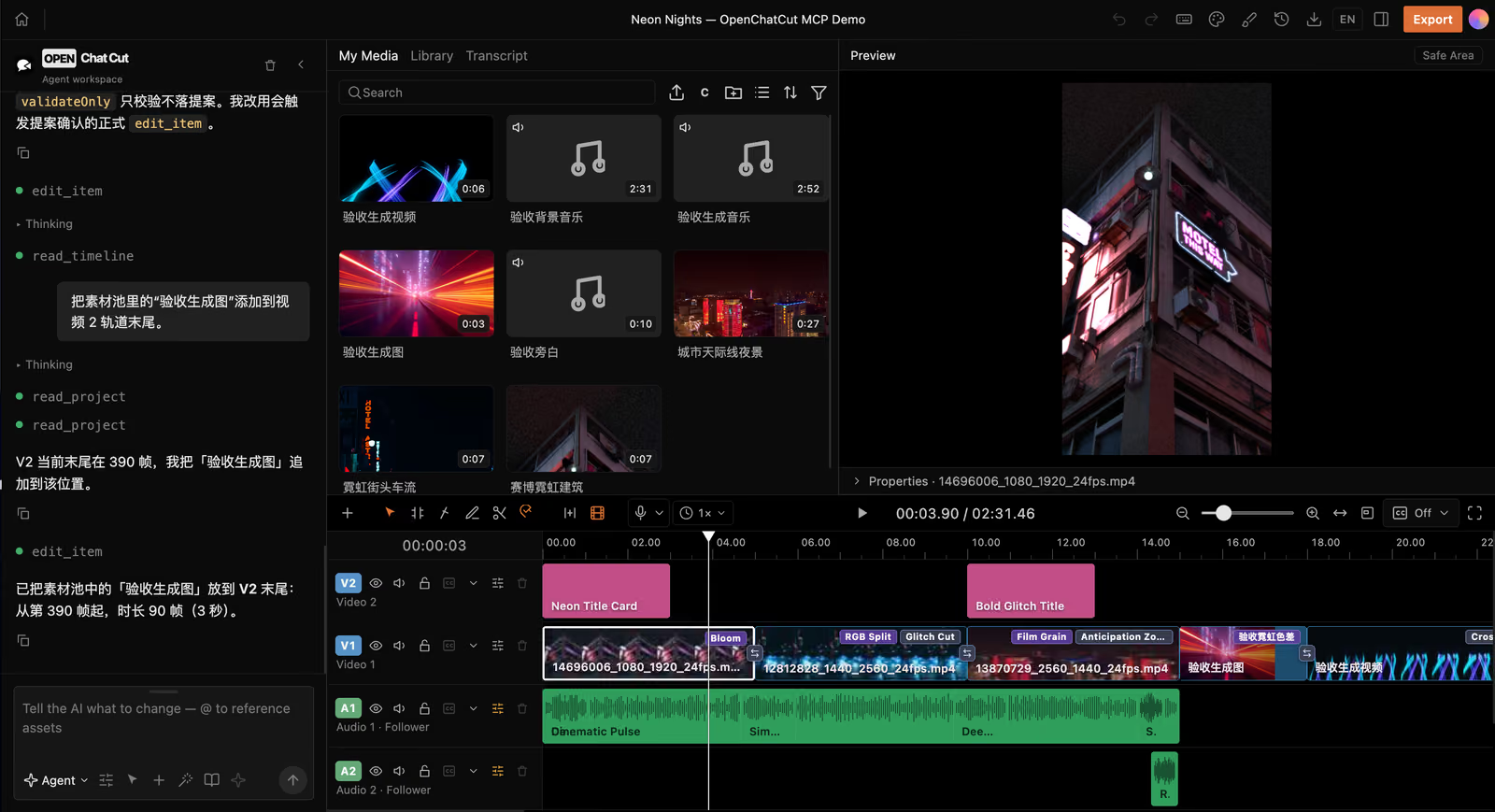
That makes it one of the more interesting Descript alternatives because it's trying to combine text-based editing with natural-language instructions.
The editor itself can work without API keys, but the assistant needs access to a supported model provider or a compatible Codex login.
The main problem is that it's still early.
The Mac builds are unsigned, and the project doesn't have the maturity of something like Kdenlive.
I wouldn't rely on it for important projects just yet, but it's worth watching.
auto-editor
auto-editor is a command-line tool that automatically removes silent or motionless sections from videos.
And it does that job really well.
For example, if you record a 30-minute talking-head video with long pauses between sentences, auto-editor can detect those pauses and cut them out.
It can also export an editable project for tools like Premiere Pro, Final Cut Pro, DaVinci Resolve, Kdenlive and Shotcut.
That's useful because you can let auto-editor handle the boring cleanup, then finish the video in your normal editor.
There are two limitations.
First, it's a command-line tool, so you'll need to be comfortable using a terminal.
Second, it doesn't understand what you're saying. It detects silence, not filler words or bad takes.
So it won't necessarily remove an "um" in the middle of a sentence or recognize that you repeated the same line three times.
But if all you want is automatic silence removal, it's an excellent free tool.
Donkey Cut
Donkey Cut is our open source video editor, so I'm obviously biased here.
One of the reasons I started building it was that I found traditional video editing unnecessarily complicated.
And cleaning up talking-head videos is a good example.
If you record yourself talking for 20 minutes, you probably have a bunch of pauses, filler words, mistakes and sentences you recorded multiple times.
Removing all of that manually is tedious.
Descript solves this by letting you edit the transcript.
Donkey Cut takes a different approach.
Instead of deleting words yourself, you can ask the assistant to clean up the recording.
For example:
- "Remove all the ums and long pauses."
- "I recorded some sentences multiple times. Keep the last good take."
- "Remove the mistakes and add captions."
The assistant analyzes the recording and makes the cuts directly on a real timeline.
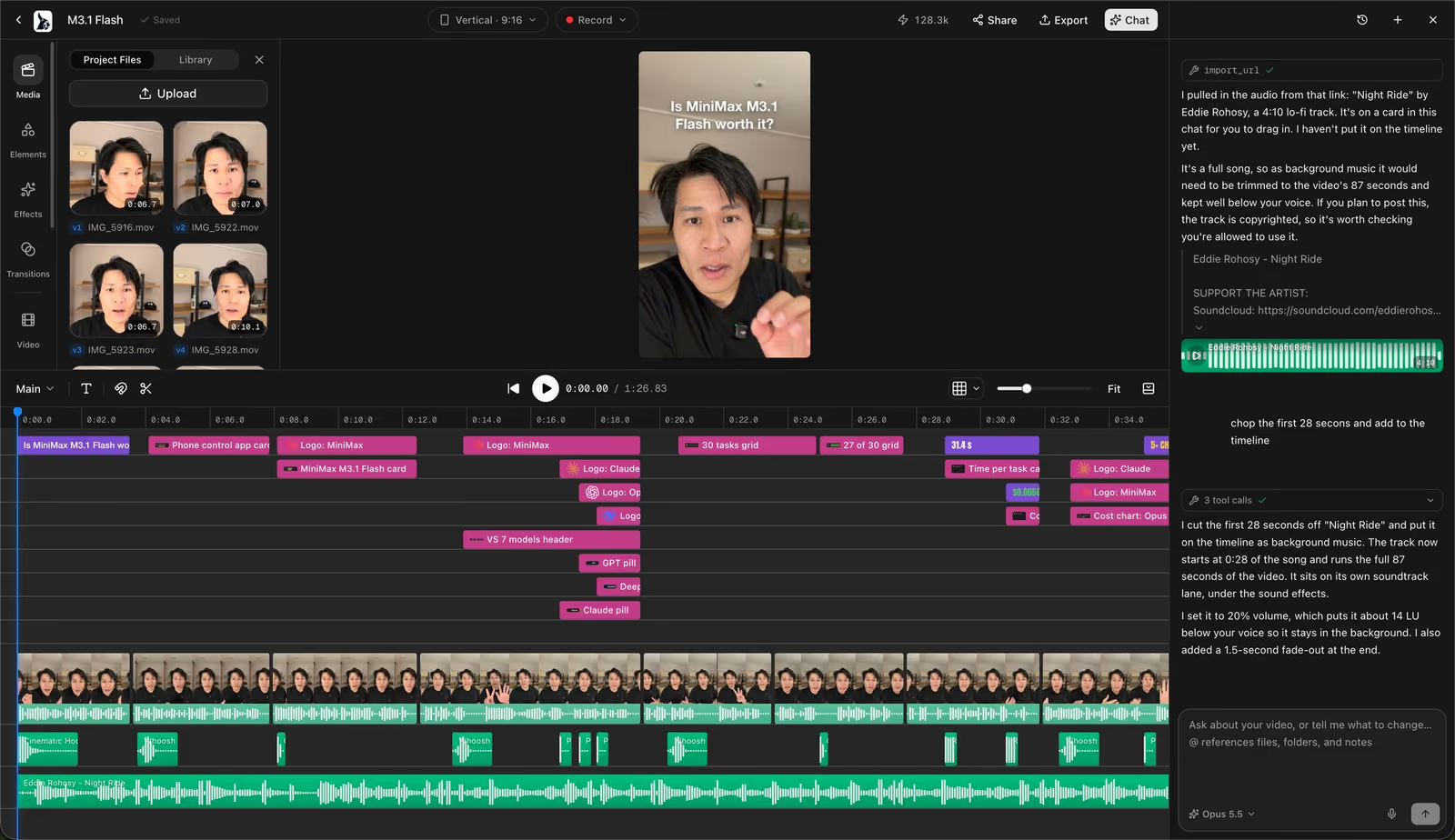
You can review every edit, adjust it manually or undo anything you don't like.
On a Mac, transcription runs locally, and the assistant can use your existing Claude Code or Codex subscription. You don't need to set up API keys.
Donkey Cut also has a traditional multitrack editor with captions, effects, music, transitions and color grading.
But it's important to understand what it doesn't do.
Donkey Cut doesn't have Descript's text-based editing interface.
You can't edit the video by deleting words from a document the way you can in Descript.
It also doesn't have a direct replacement for Studio Sound or built-in voice cloning.
If transcript editing is the main reason you use Descript, Audapolis or Kdenlive is a better match.
But if you're mainly using Descript to remove mistakes, filler words and pauses, Donkey Cut is worth trying.
It's free and open source under Apache 2.0.
You can try it at donkeycut.com, and the source code is available on GitHub.
Edit your next video with Donkey Cut
A free, open source video editor. Edit with chat, generate video, images, voiceovers and music, and keep your projects on your own machine.
Open Donkey Cutvideo-use
video-use is an interesting project if you're already using coding agents like Claude Code or Codex.
Instead of opening a traditional editor, you give the agent a video and ask it to make changes.
It can read transcripts, inspect frames, remove filler words, cut out dead space and add subtitles.
Then it uses FFmpeg to render the finished video.
The big difference from Donkey Cut or Kdenlive is that you're not working inside a traditional editor.
The output is a finished video file rather than a project you can easily adjust on a timeline.
It also needs an ElevenLabs API key for transcription.
If you're comfortable with coding agents and want to automate simple video editing tasks, it's worth checking out.
But if you want to review cuts visually or make manual adjustments, I'd use a regular editor instead.
Resemble Enhance
Studio Sound is probably one of Descript's most useful features.
You can record audio on a mediocre microphone, turn on Studio Sound and get something that sounds much closer to a professional recording.
It's not just basic noise removal. It can actually improve the quality of your voice.
Resemble Enhance is one of the closest open source alternatives.
It can remove noise, enhance speech and make thin or low-quality recordings sound fuller.
It runs locally, so you don't need to upload recordings to a cloud service or pay for an API.
The downside is that it's not a polished desktop application.
You'll need to be comfortable setting up Python and running the model yourself. A GPU also helps with performance.
If you're willing to do that setup, Resemble Enhance is worth trying.
DeepFilterNet
DeepFilterNet is another open source audio cleanup tool.
It's designed to remove background noise from speech recordings.
For example, if you're recording in a room with a fan running, traffic outside or other constant background noise, DeepFilterNet can help clean that up.
It's lighter than Resemble Enhance and can even run in real time as a microphone plugin.
But it doesn't try to rebuild or enhance your voice in quite the same way as Studio Sound.
Think of it more as a noise removal tool than a complete audio enhancement system.
If you just need cleaner audio, it might be enough.
And if you want something with a more familiar interface, Audacity is another option. It has built-in noise reduction, and additional plugins can provide more advanced speech cleanup.
OpenVoice V2
Descript also has voice cloning through its Overdub feature.
The idea is simple: if you make a mistake in a recording, you can type the corrected sentence and generate it in your own voice instead of recording it again.
OpenVoice V2 is an open source alternative for voice cloning.
It supports multiple languages, including English, Spanish, French, Chinese, Japanese and Korean.
It's released under the MIT license, which allows commercial use.
But there's a catch.
OpenVoice V2 is a model, not a complete video editing application.
You'll need to set it up yourself, generate the audio and then import that recording into your video editor.
It's not nearly as convenient as Descript, but it gives you more control and doesn't require a subscription.
Just make sure you're cloning your own voice or have permission from the person whose voice you're using.
Which Descript alternative should you use?
It depends on what you actually use Descript for.
If you edit podcasts by deleting text, try Audapolis. It's probably the closest match to Descript's original workflow.
If you want transcript editing inside a full video editor, try Kdenlive. It's not as easy to use, but it has a lot more traditional editing features.
If you mainly want to remove filler words, pauses and bad takes, try Donkey Cut. You can describe the cleanup and review the changes on the timeline.
If you just want automatic silence removal, auto-editor is a great option, especially if you're comfortable with the terminal.
If you want better-sounding audio, try Resemble Enhance or DeepFilterNet.
If you need voice cloning, OpenVoice V2 is worth looking into.
You can also combine these tools.
For example, you could clean up audio with Resemble Enhance, remove silences with auto-editor and finish the video in Kdenlive.
That's more work than using Descript, but it gives you a workflow built around free and open source tools.
Frequently asked questions
Is there an open source version of Descript?
No. Descript itself is closed source.
There are open source tools that replace individual features, though. Audapolis and Kdenlive support transcript editing, auto-editor removes silences, and Resemble Enhance can improve voice recordings.
What is the best free alternative to Descript?
If you want to edit by deleting words from a transcript, Audapolis is probably the closest free alternative.
Kdenlive is better if you also need a full video editor.
If you mainly want to remove filler words, pauses and retakes automatically, Donkey Cut is another option.
Can I edit videos by editing text for free?
Yes. Kdenlive and OpenChatCut both support transcript-based video editing.
Audapolis also supports text-based editing, although it's primarily designed for audio recordings.
Is there a free alternative to Descript Studio Sound?
Resemble Enhance is one of the closest open source alternatives.
DeepFilterNet is another option if you mainly need background noise removal.
How can I remove filler words from videos for free?
Donkey Cut can find and remove filler words when you ask its assistant to clean up a recording.
video-use can also remove filler words through coding agents, although it requires an ElevenLabs API key for transcription.
auto-editor is useful for removing silence, but it doesn't understand filler words.
Is there an open source alternative to Descript Overdub?
Yes. OpenVoice V2 is an MIT-licensed voice cloning model that supports commercial use.
It requires more technical setup than Descript because it isn't a complete editing application.
Can these tools work offline?
Many of them can.
Audapolis, Kdenlive, auto-editor, Resemble Enhance, DeepFilterNet and OpenVoice V2 can all run locally.
Donkey Cut can transcribe locally on a Mac, but its assistant uses your chosen model provider to process editing requests.
Does Descript work on Linux?
Descript doesn't offer a native Linux application.
If you're using Linux, Audapolis, Kdenlive and auto-editor are good alternatives.
Can I use these tools for commercial projects?
Most of the tools listed here use licenses that allow commercial use, including MIT, Apache 2.0, GPL, AGPL and the Unlicense.
Just remember that open source code and model weights can have different licenses. Always check both before using a model commercially.
Final thoughts
I think Descript got something important right.
Most people don't want to spend hours moving clips around on a timeline just to remove mistakes from a recording.
Editing video should be easier than that.
Descript approached the problem by making video editing feel like editing a document.
And that works really well for certain kinds of videos, especially podcasts, interviews and talking-head recordings.
But I don't think transcript editing is the only way to solve the problem.
Sometimes you don't want to delete every "um" yourself. You just want to tell the editor to clean up the recording and move on.
That's part of what we're trying to do with Donkey Cut.
The open source alternatives aren't quite at the point where one application can replace everything Descript offers.
But there are already some good options, and depending on which features you actually use, you might not need Descript at all.
Edit your next video with Donkey Cut
A free, open source video editor. Edit with chat, generate video, images, voiceovers and music, and keep your projects on your own machine.
Open Donkey Cut